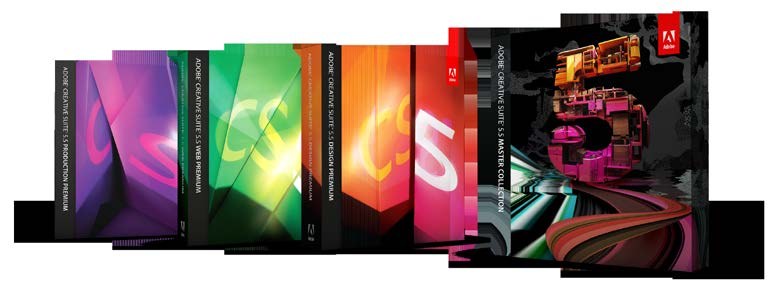
If you’re into photography or design, and unless you’ve been hiding under a rock, you’re most likely aware that Adobe recently updated their flagship application suite to CS5.5. What’s interesting about this particular version is that it marks the first of what Adobe calls ‘mid-cycle’ releases. As technology marches to an ever more frenetic drumbeat, the company has decided to alter its tried-and-true release strategy to include more frequent updates in an effort to more effectively address the changing tech landscape.
The impetus this time? Tablets. If you’re reading this, you have one… and Adobe is banking on near term explosive growth in this market. Indeed, many of the new features in the suite have been designed with the tablet and mobile devices specifically in mind.
What’s in it for Me?
As a photographer, you’ll be wondering what goodies this new update has in-store that will help you produce better images or make your creative life easier. Well, for starters the first thing you’ll notice is that not all applications have been updated to a 5.5 version number… and that includes Photoshop which gets a relatively minor upgrade to 5.1.
While the other members of the Creative Suite definitely got more love this release, that doesn’t mean that our beloved Photoshop got nothing — and again if you’re reading this on a tablet (which you are), you’re going to be able to take advantage of the new functionality Adobe is offering. What they’ve been hard at work coding is an upgrade to their internal scripting engine which has been released as the Photoshop Touch Software Development Kit or SDK which enables developers to interface between tablet-based applications and Photoshop in real time.
Wow… really? That’s it? Do I have to learn how to write code to use this? Sounds complicated. Well, if you’re not a programmer, have no fear. This update is meant to provide those that are with the tools to create great apps which make your mobile creative life integrate directly with your desk-bound one. To this end, Adobe has produced some great sample apps which demonstrate the utility of their new interface.
Hot Lava
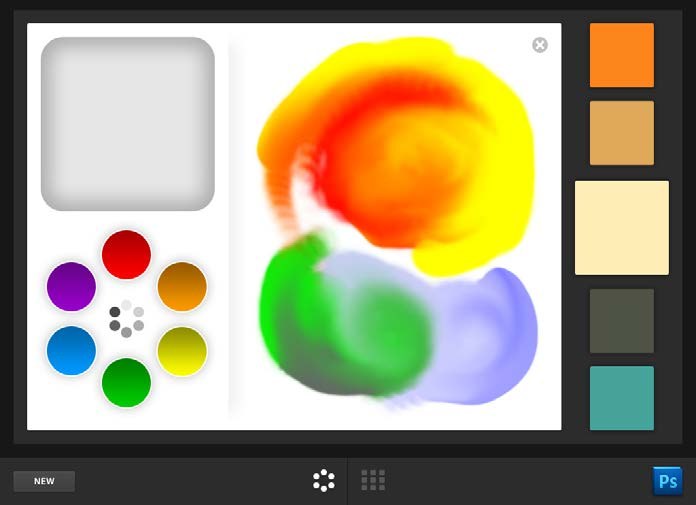
Adobe Color Lava is an awesome little application available through iTunes for the iPad at the very reasonable price point of $2.99. Intended as a virtual replacement for the artist’s palette, Lava enables the user to mix colours directly on the screen in the same manner as you would using physical paint… though with your finger instead of a knife or brush. There’s even a water well which allows you to rinse some or all of the selected virtual colour from your finger to get finer control over the result! Very cool… but what practical application does this have?
If you’re like me, you may find the colour module within Photoshop rather cumbersome. Lava feels much more natural, has a larger interface and allows you to perform some very cool operations within Photoshop itself. First, any colour swatch you create in Lava may be tapped on your tablet which (once you set up the easy wireless connection between it and Photoshop) automatically updates the foreground colour in Photoshop. You may save up to 1500 swatches within Lava, or export any of them directly to the parent application with the touch of a button.
When creating a colour swatch collection (i.e. 5 swatches), you may elect to import an image to the stage, and simply tap various colours within it to rapidly build your palette. Not only this, but you may mix colours directly within the image… using only those within it, or adding your own. How cool is that? You can even send your newly created swatch library by email from your iPad to any colleague you may be collaborating with.
Hotter Nava!
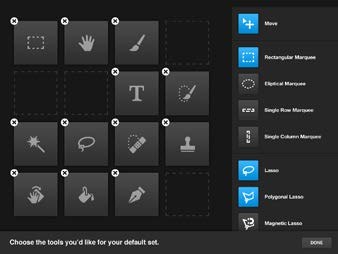
Ok, that subheading doesn’t really work, but the new Adobe Nav app does. At $1.99, this nifty application will enable you to access all your most commonly used toolbar selections by simply tapping the customizable interface which enables you to choose up to 16 default functions and arrange them any way you please — fantastic if you find you are for example frequently accessing the retouching tools which are nested within a single button on the toolbar.
Additionally, Nav allows you to see all your open Photoshop documents as large thumbnails within a scrolling interface, and open the appropriate tab by merely tapping its corresponding image on the tablet. This is way better than having to read tab titles — especially when you have a great many documents open. Double tap the image, and you’ll get all its relevant stats: image size, dimensions, document size, resolution, and colour mode. Walk away from your computer and show someone else your work on the tablet with full resolution accessible via pinch and zoom… even when you’re not connected to the network! Further, you may tap the ‘Screen Mode’ button and cycle through all those available to you; while selecting ‘Actual Pixels’ zooms you in to 100%.
Obviously this functionality is less useful to photographers and aimed more squarely at designers; though some may find it handy when creating photo books for creating type that goes well with their imagery… and the price is certainly right.
What’s Missing?
While this is an excellent first effort, Adobe Nav and Lava would certainly benefit from the addition of a few features. I’d love to be able to save tool sets which would be applicable to different tasks I commonly perform. Also, while Nav’s ‘Actual Pixels’ button zooms you in, there doesn’t seem to be an obvious way to zoom back out… so I’m reaching for the keyboard again, which is frustrating as I find using Nav in combination with a graphics tablet to be its most valuable application.
Switching between Lava and Nav presents a small delay while the app reconnects (about a second) to the Photoshop server. This isn’t really that big of a deal but rather a minor inconvenience and won’t present an issue to all but the most ADHD stricken users. Ultimately it’s most likely a function of the underlying iOS architecture.
Lava on the other hand would be great to use with all the other design applications within CS5.5. While I can send swatch sets to Photoshop, export them, then import to InDesign or Illustrator, it certainly seems a roundabout way to utilize the power of the app… and there’s no tapping to select foreground colour.
Notwithstanding the minor criticisms above, we fully expect both these apps to get better and better and more fully integrated into the entire suite in future versions. All in all, we’d say they’re exceptional value, and highly recommended.
Should You Upgrade?
If you have Photoshop CS5, it’s probably not mandatory; however, the upgrades from CS3 and CS4 are substantial. Further, one of the things Adobe has introduced with this mid-cycle release is an all new software subscription model where you simply pay a monthly fee, ranging from a low of $35 for Photoshop alone (annual commitment required), through $195 USD for the complete Master Collection without an annual commitment, and are always assured of having the latest version.
Next Time
In our next issue, we’ll continue to delve into the Creative Suite family of applications with an in-depth review of Adobe’s video editing software: Premiere Pro. As this software title has undergone significant revision, and therefore merits its 5.5 designation; we’ll devote an entire column to its review.
Afterword: The Good, the Bad and the Ugly
Though not necessarily of interest to photographers, the centrepiece of CS5.5 is without question the new Digital Publishing Suite, designed to enable delivery of engaging, next-generation content to the tablet medium. Adobe accomplished this design goal exceptionally well. The interfaces within Adobe DPS are easy to use, intuitive and robust. In fact, this magazine was originally built using them.
We entered the pre-release program after investigating the pricing options which had been published on their website for months, and were very excited about the prospects presented by this new market and the types of content we would be able to present on the tablet platform. This software would enable us to deliver what we felt a digital magazine should be. That was the good; the bad was to follow.
A few weeks in advance of us releasing our first issue, Adobe radically altered their pricing scheme, requiring publishers to fork over several thousands of dollars (five figures) in advance for a year’s access to their publishing solution… and this was their lowest price option. As a startup, and given the market is unproven as yet (due to it being brand new), this demand obviously stuck in our collective craws — especially as we felt we had been operating in good faith under the published pricing structure.
Over the next month, the agreement seemed to change every week… going from bad to worse from our perspective and costing thousands more every single time. Our primary concern was what would happen if at some point in the future Apple decided to disallow Adobe’s solution to be sold on iTunes? It had happened before — would we be out a year’s subscription? We didn’t envision Adobe providing refunds as they were selling this service solely through resellers, and not directly.
Next, it got ugly. Adobe disabled the ability for publishers to test their content on their own tablets without first uploading it to the company’s web portal, and thereafter downloading it back to their devices. As most magazines represent hundreds of megabytes of content, this is a huge time wasting inconvenience — not to mention the fact that many ISPs have bandwidth caps and charge exorbitant sums for overages.
As a result of the above, there was heated and protracted discussion within the community, and to their credit, it appears Adobe has listened. A new subscription and pricing model is said to be becoming available in September. We at DarkroomPro Magazine think Adobe is an incredible company, which produces amazing, category-defining products — year in and year out. Sometimes things go wrong… it happens. As a result, we have high hopes for this new model, and look forward to again bringing you our mag via the Digital Publishing Suite at some time in the future.