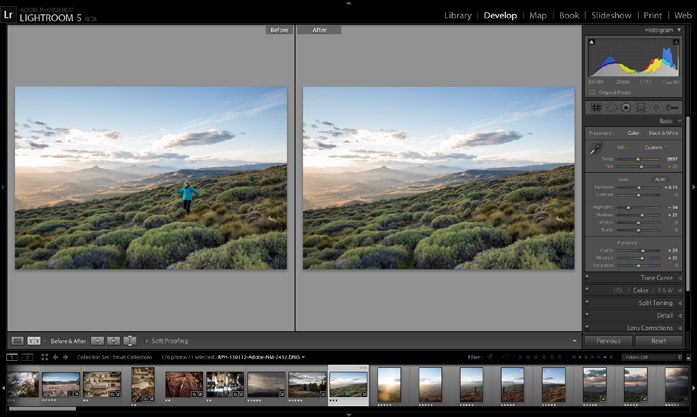
Just as we were about to pull the trigger on publishing this issue, we received a mysterious note from Adobe, inviting us to a press conference in order that we might witness the unveiling of their latest product — which turned out to be Lightroom 5. We postponed publication until Adobe’s embargo on releasing information about the application had expired, and are now pleased to provide you with all the juicy details…
Now, as regular readers of DarkroomPro will know, we’ve always been big fans of Photoshop Lightroom, and indeed use it for all our personal and professional imaging tasks. In our last issue, we highlighted all the advances in the previous version, wondering what they could possibly include in the next. Let’s just say we weren’t disappointed!
While at present, Lightroom 5 is still only available as a public beta, free for anyone to download and try, it’s remarkably stable (we only experienced one issue that caused the program to get stuck on the move and zoom hand tool, which was rectified with no data loss by simply restarting the program), and the enhancements are such that we’d be surprised if all current users didn’t start using it immediately. Here’s a quick rundown of the new features you can expect to find…
Radial Filter
One of the first additions you’ll see in the Develop module is a radial filter which permits the user to select a circular or oval area, and then apply any of the effects which were previously only available through an adjustment brush to the entire area outside (the default), or inside that selection. This is a great way to isolate a subject in a manner similar to using vignetting, but is significantly more flexible, as you can utilize sharpness, exposure, clarity etc. in support of that goal. Neat!
Advanced Healing Brush
Everyone wants to look great in their photos; and often it’s better to give a client a shot that more closely resembles what they think they look like, rather than the stark reality revealed by tack-sharp lenses and high resolution cameras. The new healing brush affords the user significantly more control over the subtlety of the effect you are trying to achieve in this regard. Better than any wrinkle cream ever invented, use the Advanced Healing Brush to soften the look of fine lines in your portraits, while retaining some semblance of truth in your images. Further, you can use the brush to completely remove unwanted elements from a photograph as depicted in the example. Performing this task seamlessly in past often required a quick trip to Photoshop, but now that same power resides in Lightroom.
Visualizer Spots
Dust particles on your sensor and lens are the bane of every photographer. Granted, recent advances in sensor cleaning technology have lessened this to a certain degree; however, dark spots on our photos, particularly at smaller apertures, are still an unfortunate fact of life. Given these may sometimes only present themselves when viewing an image at 100%, they are often only discovered upon printing. Of course, by that time it’s too late, and you’ve wasted time and money.
In an effort to make our lives easier, Lightroom’s new Visualizer Spots feature enables the photographer to quickly and easily detect dust particle spots by inverting the image and dramatically enhancing the contrast — revealing once hidden anomalies with ease. Now it’s just a simple matter of a few clicks, some judicious use of the spot removal tool, and hey presto — you’re ready for the printer. Great addition.
Upright
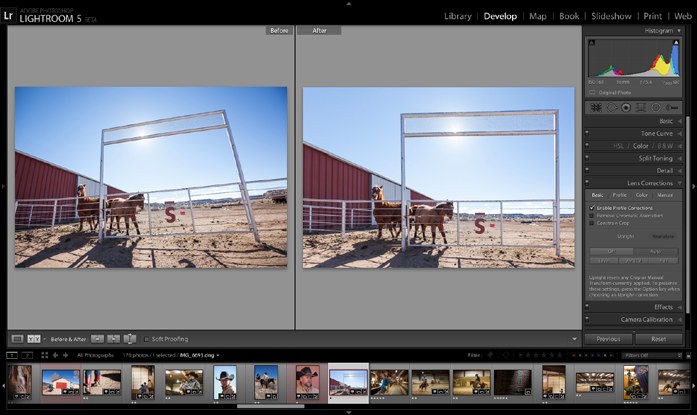
Previous versions of Lightroom featured perspective correction, primarily based on lens profiles that come installed with the application; however, these didn’t always prove adequate to the task. Certainly manual perspective correction was also available; however, the interface and controls were a little arcane, and difficult to use for many.
Lightroom 5 includes a new feature named ‘Upright’ which corrects perspective automatically and rapidly by detecting both horizon and leading lines, and making adjustments based on these measures. Manual corrections are still available however — and sometimes you’ll still need them — but the utility is remarkably effective, and will definitely save time and lessen frustration for photographers everywhere!
Smart Previews
Don’t want to clutter up your hard drive by storing your entire image collection locally? Still want to be able to make adjustments to your images while on the go? Smart Previews to the rescue! This new Lightroom feature enables the user to employ a cache of smaller preview photos in support of making alterations, either in metadata or the Develop module. Simply reconnect your external or network drive and all the adjustments you’ve made will automatically sync up. Easy peasy.
Of course, if you are doing pixel level edits such as sharpening or spot removal etc. — anything you’d normally do while zoomed in to 100% — you’d best wait until you’re able to access the actual file, as your alterations will be less accurate when performed on a preview sized image.
Book Benefits
Lightroom 4 introduced the Book module, which allowed the photographer to generate excellent quality paper-based publications from the Blurb online publishing service. The included templates definitely simplified the task of whipping together a professional looking coffee table book; however, we creative types are typically demanding of more flexibility than what is afforded in the utilization of canned layouts. Adobe has responded by enabling the user to customize the included templates — empowering photographers to create publications which are truly personal and unique. Hat’s off, Adobe!
First Impressions
Though we haven’t had a great deal of time to play with Lightroom 5 beta, we’ve been really impressed with what we’ve seen so far. One of the initial things we noticed was the fact that, despite the ‘beta’ state of the software, and the attendant lack of optimization that typically characterizes applications at this stage of development, performance was extremely peppy compared to its predecessor — particularly (given the beta won’t import catalogues from previous versions) in importing photographs into a new catalogue. The Mac we ran it on for testing was a little underpowered for the previous version, but ran considerably more smoothly in nearly every way for Lightroom 5. The new features, while not revolutionary, are definitely welcome additions, and will go far in streamlining photographers’ cataloguing and editing tasks. We certainly look forward to the final release and the inevitable performance tweaks that will surely make this the best version yet!