Once upon a time, photographers shot still images… that was it. It was about capturing the essence of a moment in time — not faithfully duplicating an extended period of it. Nowadays, not only are point-and-shoots coming equipped with basic movie mode, but every pro body now features advanced video capture functionality.
Well that’s great for journalists, whose ever-expanding job descriptions now include documenting the key moments in a situation as it unfolds via the still frame, as well as creating professional-grade video content… but what about the rest of us? For most photographers, video has taken a distant back seat to single-frame capture; however, now that the tools are being included in our bodies by default, many are diving into this new medium head-first.
So off they go and capture hours of raw footage, only to bring it home to discover they’re really not sure what to do with it all. Certainly, there are lots of inexpensive video editing packages available out there; but like most photographers, the perfectionist in them demands more of their work than many of these software suites are able to provide.
Enter Adobe Premiere Pro
Not many years ago, non-linear video editing was the province of professionals utilizing software costing thousands of dollars on dedicated specialty video editing computers. That’s all gone. Seeing into the future, Adobe recognized the market’s potential and released Premiere in 1991 on the Macintosh. Premiere Pro, its successor, was produced by the company in 2003, and the video editing landscape has never been the same.
With pricing options that now include $49 a month via Creative Cloud for the complete Adobe software collection (Photoshop, Lightroom, Illustrator, InDesign, Premiere Pro and nearly 20 other titles) or $19.99 for Premiere Pro by itself, professional post production results are now available to most anyone!
What’s in it for Me?
Of course Premiere Pro can do everything you’d expect of a non-linear video editing package: trim and splice clips together, create transitions between them, add music and graphics, and export to DVD or digital video file format. Certainly it handles all these tasks with ease, but what else does it offer the photographer interested in video?
For starters, Premiere Pro handles both Nikon and Canon’s video formats natively… in addition to those of many other manufacturers. This is a huge time saver as no lengthy transcoding conversions are required — just plug it in, and it works. Furthermore, the software integrates seamlessly with Photoshop, allowing you to import your still creations — with all their layered effects intact — into video projects with ease. Not only that, but with Photoshop Extended (included in Creative Cloud), you can do pixel level editing of video — clone, paint, make lens corrections, colour correct etc. — and then import directly to Premiere Pro. What’s more, the inclusion of many Photoshop-like controls allow the user to quickly fix their video’s audio, exposure or colour problems within the application itself.
Everyone knows that audio capture on DSLRs, while having seen significant improvement over the past few years, still, in large, leaves a little to be desired. Managing separately recorded audio sources is a snap in Premiere Pro by way of the Merge Clips feature, which allows you to seamlessly integrate and sync your high quality DSLR video, with an audio track that actually measures up. The audio controls within the application also provide extreme flexibility in editing this critical component of your digital video project… so even if you’re stuck with less than optimal audio, Premiere Pro will allow you to squeeze the best out of it!
Finally, the application utilizes your computer’s graphics processor when rendering video by way of its advanced 64 bit Mercury engine, making short work of otherwise time consuming and tedious media preview and encoding. What more could you want? Read on…
CS6 Enhancements
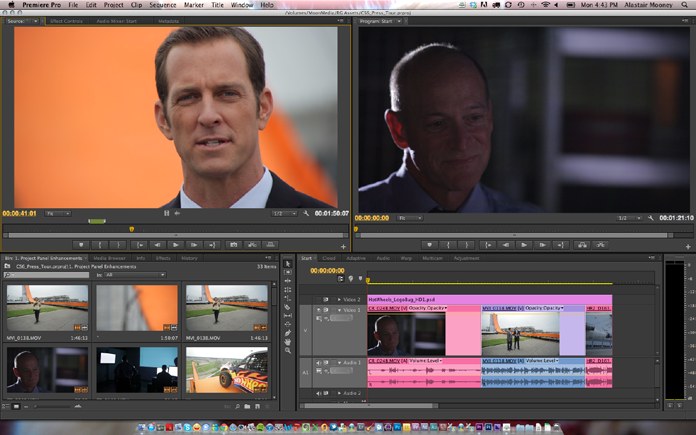
Adobe’s latest video editing offering certainly wasn’t neglected in terms of upgrades in CS6. A sleeker, more user-customizable interface features a default ‘two-up’ workspace which allows you to see source clips and the program monitor simultaneously in an uncluttered UI that provides more room for video display. The monitor panels also feature customizable button layouts, allowing you to reposition or replace any of the transport or default controls with those you’d prefer. Or, for those for whom keyboard shortcuts are the way to go, dispense with them entirely, leaving more room to view your content.
The audio mixer has seen significant improvements as well, including the multichannel look and feel of that which is included in sister application Adobe Audition. Much requested features, such as quickly resetting a fader to zero, are now handled through a simple double click. Additionally more options are present for easily reviewing peaks and valleys in your track — with both static and dynamic indicators available by way of a contextual menu. Even little things like automatically scaling the interface elements when you resize the panel are welcome additions… and include intelligence enough to switch between horizontal and vertical orientation depending on how you alter the UI window.
Finding your content has never been easier thanks to new views which are available in the project panel. Featuring 16:9 resizable thumbnails of your video elements, the application allows you to scrub through by simply hovering your cursor over the clip, and even mark In and Out points directly within them for rapid initial editing. Very handy indeed.
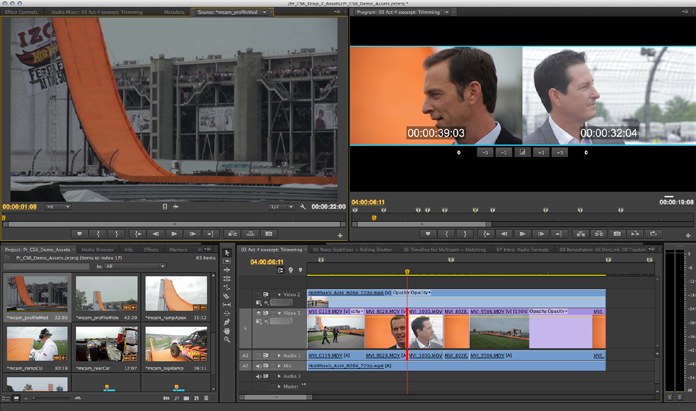
The task of trimming clips has seen significant attention in this latest release with the advent of Trim Mode in the Program Monitor which provides ‘two-up’ display of the outgoing and incoming clips with buttons for performing common trim and transition functions. Knowing how much time is spent on this task, Adobe has also included more than 10 new convenient keyboard shortcuts directly related to trimming.
Of special interest to DSLR videographers, Adobe has now included Warp Stabilization in Premiere Pro. Now your shaky, handheld video can look like it was shot with a professional rig. Not only smoothing out camera motion within your clips, the Warp Stabilizer removes artifacts caused by that motion and processes individual areas of the frame to address parallax, with other modes to correct perspective, scale and rotation, or position. Originally seen in Adobe After Effects CS5.5, this fantastic feature is now resident within Premiere, and will save many an aspiring videographer’s bacon.
When you are ready to deliver your final product, these days it’s often the case that it is to be made available in multiple formats. Adobe has you covered there too. With the included Media Encoder, Premiere Pro allows you to select from a variety of presets (or create your own) and run a batch to output them all while you grab a coffee. Also included with the package, Adobe Encore allows for efficient DVD and Blu-ray authoring and even supports delivering the same robust Blu-ray experience over the Internet via a web interface! These and so many more improvements definitely make Premiere Pro CS6 the best release to date, and will be indeed hard to surpass in their next effort.
So whether you’re a video neophyte, or a seasoned veteran, there’s definitely something in Premiere Pro for you… and given the aggressive price point for the entire Adobe suite of applications via Creative Cloud, why wouldn’t you try it? Heartily recommended.