We have to admit to harbouring considerable skepticism upon reception of Adobe’s announcement regarding their new software as a service plan dubbed ‘Adobe Creative Cloud’. We felt that while a clever pricing scheme designed to entice prospective users without necessarily the means to purchase their software collections in the previous all-in-one box incarnations; ultimately, the product would end up costing users more in the long run, for what, at the time, we perceived as little additional benefit.
Ok, so we were wrong.
While certainly a great pricing and marketing endeavour, Creative Cloud has indeed been a boon to both users and Adobe alike. On the latter count, Adobe has benefited from the increased accessibility of their products given the lower barrier to entry, as well as augmented public exposure (via the complete Creative Cloud subscription option) to many of its products that heretofore were significantly less popular than their ubiquitous flagship, Photoshop. Not only this, but Adobe, who like Microsoft with their Office suite, in past actually benefitted from weak piracy protection, in that their products were so widely used that they became industry standards — later to be purchased by both corporate and private users alike. Now, Adobe’s tight integration with the cloud significantly reduces opportunities for non-licensed use; and when coupled with the aforementioned lowered barrier to entry and increased software lifecycle revenues, has the potential to dramatically add to the company’s bottom line.
On the customer side, the benefits are myriad too. True to their word, Adobe has released substantial software updates on a tight schedule — significantly upping the ante in the game to their competitors. So, without further adieu, let’s dive into the latest of them: Adobe Photoshop CC!
A Bridge Too Far?
The benefits begin to accrue immediately upon your installation of the software, in that Adobe Bridge has been excluded from the default install, significantly reducing the download size and software footprint on your machine. For Bridge fans, this may seem like a non-issue, as it is still available as a separate download within Creative Cloud; however, for those that used it seldom to never, this is welcome news. That said, Bridge offers some pretty robust features that are a godsend to those who have vast media collections to deal with and appreciate the interoperability between Adobe applications it facilitates; so while you aren’t forced into its installation, you may well want to check it out.
Cloudy on the Cloud?
Ok, so what does this cloud deal actually bring to the table? One thing to bear in mind: Adobe Photoshop CC isn’t just your favourite raster graphics editor with some Dropbox clone bolted on; it’s a well thought-out package, designed to take full advantage of the collaborative features and mobility options afforded one via robust integration with the Internet. As you’d expect, CC membership enables you to share content with others who may either download or comment on your work; however, they’re not required to actually own a CC license themselves (officially ‘Coming Soon’ from Adobe).
Additionally on the collaboration side, Creative Cloud includes a full membership on Behance, the leading social network for creatives. Here you can interact with a thriving community of designers, photographers, filmmakers and other industry professionals to get feedback on your project or work in progress, discover employment opportunities, find inspiration — or just hang out. A ProSite portfolio is included wherein you may store your projects and have them evaluated by whomever you choose.
Further, the cloud affords you the ability to sync your application preferences across multiple machines. Access all your custom brushes, actions, swatches, gradients, styles and more from anywhere! So whether you’re at home or work, on a Mac or a PC, you’ll feel right at home with everything set up just the way you like it.
What’s more, a new entry in the product suite has been included this time around: Creative Cloud Desktop application. This unobtrusive tray type app enables installation of any of the Creative Cloud components you have access to, keeps you abreast of, and allows you to initiate, any updates that may be available, notifies you of activity on your Behance account, provides access to font collections from the TypeKit (also included) site you may have created, and details your latest activity with the app.
While we’re not big fans of ‘helper’ applications that constantly run in the background using your system resources even when you’re not interested in running the associated parent program, Creative Cloud Desktop seems pretty useful in that it consolidates access to everything into one handy interface, and, of course, is easily removed from the list of startup programs by editing the preferences.
The Good Stuff
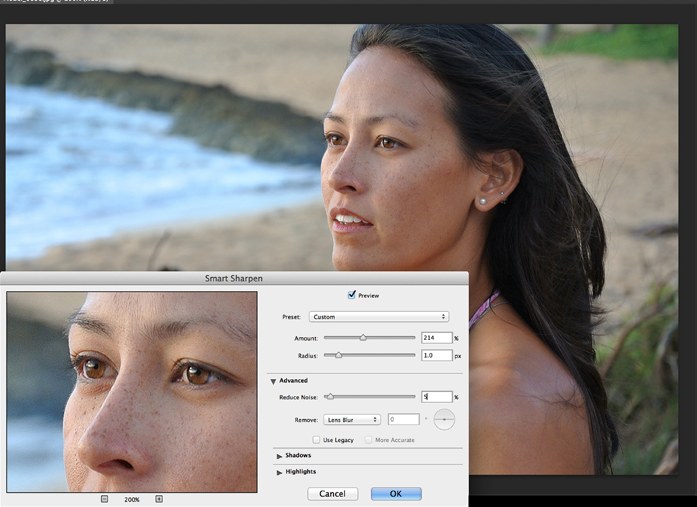
Ok, so other than cloud integration, what’s new and exciting for photographers? Well, for starters, Smart Sharpen has been dramatically improved. This intelligent and adaptive sharpening tool enables significantly higher levels of image sharpening without the normally associated artifacts left behind: halos and noise. Despite sharpening advancements in different tools over the years, many of us fall back to the good old standard, Unsharp Mask. However, after seeing what the new Smart Sharpen can achieve, I doubt I’ll be utilizing anything else in the foreseeable future.
We would advise our readers to exercise a modicum of common sense and restraint when employing this tool however. I distinctly recall thinking during the Adobe press conference wherein Smart Sharpen in Photoshop CC was first demonstrated “Whoa… that’s ridiculous”. Too much of a good thing is still bad.
Creating enlargements of digital photographs has always been problematic. Loss of detail and the introduction of noise in previous Photoshop versions when attempting this process forced many to look to third-party providers for solutions to this dilemma. With the introduction of Photoshop CC however, Adobe has clearly demonstrated the fact that it has made significant strides in rectifying this difficulty. The new algorithm’s intelligent up-sampling preserves edge details and enables the creation of stunning enlargements you can be proud to hang on any wall.
Focus on Filters
In previous versions of Photoshop, the only time you’d generally see the Camera Raw interface was upon importing a RAW file into the application. Now however, you may apply these non-destructive adjustments to layers in your document, just like any filter! Furthermore, they even work on video… how cool is that?!
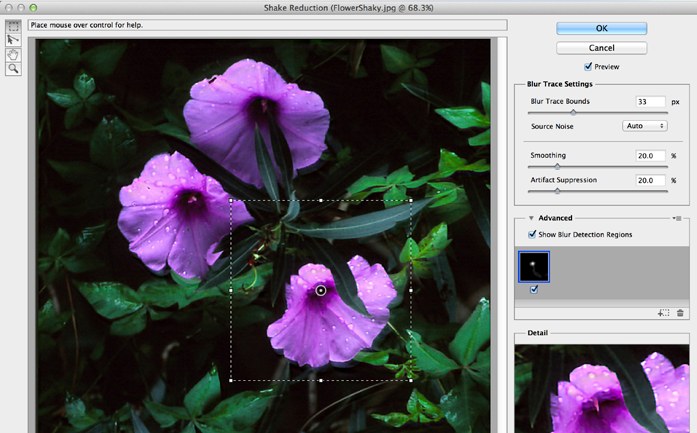
A huge boon to photographers, a new Camera Shake Reduction filter is available under Sharpen… and it’s amazing. I went back through my collection of ‘almost nailed it’ shots I had been reluctant to toss (given everything other than inadvertent camera shake was perfect), and applied the filter — turning what essentially amounted to a pile of rubbish into actually usable material. Awesome. I will have to be more judicious with my delete key from now on!
The Liquify filter has also seen a huge overhaul, significantly improving its performance. Now you don’t need a supercomputer to experiment with this powerful tool, and what’s more, in Photoshop CC it can even be used as a ‘Smart Object’ — non-destructively. Finally, the Blur Gallery, first introduced in CS6 which enables you to produce tilt-shift effects, iris blur (simulated shallow depth of field), and field blur (multiple point selection and blur application within an image), is now also available as a smart filter. So feel free to experiment liberally… it’s all non-destructive.
Conclusion
While we’ve just barely scratched the surface of all the new features and tweaks Adobe has brought to the table, we feel that Photoshop CC has definitely lived up to the promise the company made: to repeatedly bring comprehensive and value-packed updates to their products on a very aggressive schedule. So should you take the plunge and spring for the new version? Definitely.